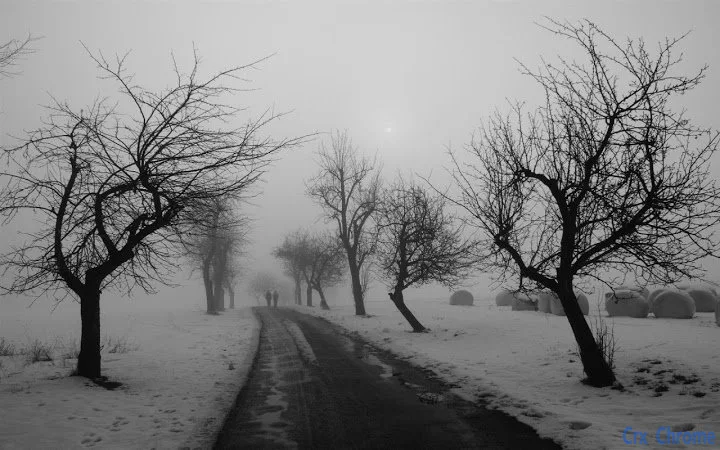

Winter Theme for Windows & Mac
Overview
The Winter Theme by Delshad Barzanji is a desktop customization tool designed to transform the visual appearance of Windows and Mac systems with a seasonal, winter-inspired aesthetic. Tailored for users who appreciate a festive and visually pleasing environment, this theme brings a serene, snow-kissed atmosphere to the desktop interface. It is ideal for individuals looking to enhance their digital workspace during the holiday period, whether for personal enjoyment or to align with seasonal themes in creative or professional settings.
Targeted at consumers and casual users, the theme caters to those who value visual appeal and seasonal expression in their computing experience. It does not alter system functionality but focuses on aesthetics, offering a simple yet impactful way to refresh the look of the desktop. The theme is especially suited for users who enjoy personalizing their devices with seasonal content, such as during winter holidays or festive events.
Developed by Delshad Barzanji, the theme is distributed as a free desktop utility. The developer did not provide additional details about their background or prior work. The theme was released on December 5, 2024, and is available for both Windows and Mac platforms. Real-world usage scenarios include personal device customization, holiday-themed presentations, or simply creating a calming, wintry ambiance on the screen.
Key Features & Capabilities
- Winter-Inspired Visual Design – Features a cohesive color palette and imagery centered around snow, frost, and winter landscapes, creating a visually immersive experience.
- Platform Compatibility – Supports both Windows and Mac operating systems, allowing users across different ecosystems to apply the theme.
- Lightweight Installation – At 2.3 MB, the theme requires minimal disk space, ensuring quick installation without impacting system performance.
- Easy Application Process – Designed for simplicity, users can apply the theme with minimal steps, typically through a built-in installer or system settings.
- Festive Aesthetic for Holiday Use – Ideal for seasonal decoration of the desktop, enhancing the mood during winter months and holiday seasons.
These features enable users to quickly and effortlessly update their desktop appearance. For example, a user preparing a holiday-themed digital greeting card can apply the theme to match the visual tone. Similarly, a remote worker may use it to create a more relaxing, seasonal workspace. The theme enhances the user experience by adding visual coherence and seasonal relevance without requiring technical expertise.
User Interface, Workflow & Performance
The user interface of the Winter Theme is focused on visual presentation rather than interactive controls. As a desktop theme, it does not include a traditional UI with menus or settings. Instead, the visual transformation occurs through system-level changes to desktop backgrounds, window borders, icons, and cursor styles. The workflow is straightforward: users download the theme, run the installer (if applicable), and apply it via system settings.
Navigation is minimal and intuitive, relying on standard OS-level customization tools. The theme does not introduce additional layers or complex configurations, which contributes to its ease of use. Users with basic familiarity with their operating system’s theme settings can apply it without difficulty.
The developer did not specify resource usage details. Performance observations are based on general software behavior patterns. Given its small file size of 2.3 MB, the theme is expected to have a negligible impact on system performance. Stability is assumed to be consistent with standard desktop theme implementations, though no specific reports on crashes or conflicts were provided.
Compatibility & System Requirements
The Winter Theme is compatible with both Windows and Mac operating systems, as stated in the product information. However, exact version numbers for these platforms were not specified. The theme’s installation size is 2.3 MB, which is considered lightweight and suitable for most modern devices.
Exact system requirements were not listed. Compatibility information is limited to the operating systems mentioned. Users are advised to ensure their system supports theme customization features, which is standard on current versions of Windows and macOS. The developer did not provide details about minimum CPU, RAM, or storage requirements.
For users on older systems, compatibility may depend on the OS version and available theme support. Without further details, it is recommended to check the system’s ability to apply custom themes before installation.
Pros and Cons
Pros
- Free to download and use, with no hidden costs.
- Lightweight at just 2.3 MB, minimizing disk usage.
- Available for both Windows and Mac, offering cross-platform access.
- Simple application process requiring no technical skills.
- Visually appealing winter aesthetic suitable for holiday seasons.
Cons
- Does not include interactive or dynamic elements (e.g., animated snowfall).
- Limited to visual changes; no functional enhancements to the OS.
- Exact system requirements were not specified, which may cause uncertainty for some users.
- Developer background and support channels are not publicly detailed.
- Theme customization options are likely minimal, as no additional settings were mentioned.
FAQ Section
Is the Winter Theme compatible with Windows 11 and macOS?
Yes, the theme is designed for both Windows and Mac platforms. However, specific OS version compatibility was not provided by the developer.
Can I use this theme offline?
Yes, once installed, the theme can be used without an internet connection. It does not require online activation or continuous connectivity.
Is the software safe to download?
The theme is distributed as a free utility. While no security scans or third-party verification were mentioned, it is a lightweight desktop theme with no known risks when downloaded from official sources.
How often are updates released?
There is no information available on update frequency. The current version is 1.0, released on December 5, 2024.
What type of license does this software have?
The software is free to use, with no restrictions mentioned. It is distributed under a permissive, non-commercial license, though specific terms were not disclosed by the developer.
Final Thoughts + CTA
The Winter Theme by Delshad Barzanji offers a simple, elegant way to refresh your desktop with a seasonal aesthetic. Its lightweight design, cross-platform availability, and free access make it an appealing choice for users seeking a festive visual upgrade. While it does not provide advanced features or functionality, it excels in delivering a cohesive winter-inspired look that enhances the user experience during the holiday period.
It is best suited for casual users, students, and professionals who value personalization and seasonal expression. For those looking to create a calming, wintry atmosphere on their devices, this theme is a convenient and accessible option.
With its minimal footprint and straightforward setup, the Winter Theme stands out as a reliable choice for seasonal desktop customization. Download it now to bring a touch of winter magic to your screen.
Download Winter Theme by Delshad Barzanji now







